- Published on
Kubernetes dashboards after OpenLens: 13 alternatives compared

- Authors

- Name
- Nadim Tuhin
- @nadimtuhin
On this page
If you've been using OpenLens to manage your Kubernetes clusters, I have bad news: it's no longer being maintained. The last update was months ago, and the community has moved on.
The Kubernetes dashboard ecosystem has plenty of alternatives. After testing 13 different tools across my production and dev clusters, I've compiled this guide to help you find your next Kubernetes UI.
TL;DR: my top picks
| Use Case | Tool | Why |
|---|---|---|
| Terminal power users | K9s | Fastest, most efficient, works over SSH |
| Teams needing web UI | Headlamp | CNCF Sandbox project, modern UI |
| Mobile monitoring | Kubenav | Only option with iOS/Android apps |
| Full DevOps lifecycle | Devtron | Built-in CI/CD, security scanning |
| Vim users | kubectl.nvim | Never leave your editor |
Why OpenLens died (and what to do about it)
Lens started as an open-source project but gradually moved toward a commercial model. The community fork, OpenLens, kept the open-source version alive until it didn't. Development stalled, bugs went unfixed, and security patches stopped coming.
A new fork called Freelens has picked up where OpenLens left off. But if you want to explore what else is out there, read on.
Top alternatives to Lens
Kubernetes dashboards fall into two categories: graphical user interfaces (GUIs) and terminal user interfaces (TUIs).
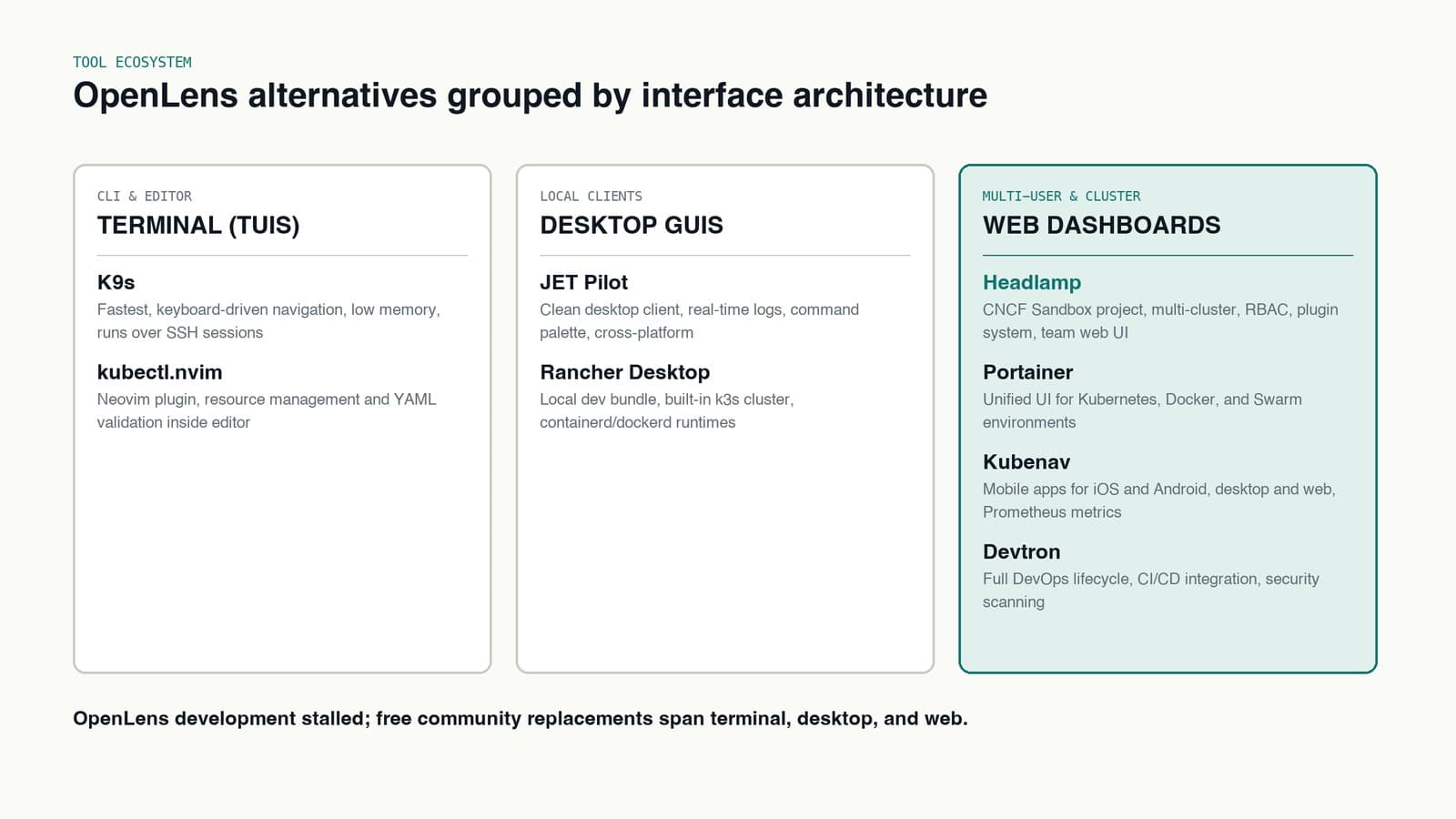
Terminal-based dashboards (TUIs)
K9s: the terminal lover's dashboard
K9s provides a terminal-based UI for Kubernetes. Despite being terminal-based, it offers a rich and interactive experience.
Installation:
# macOS
brew install derailed/k9s/k9s

# Linux (via snap)
sudo snap install k9s

# Windows (via scoop)
scoop install k9s

# Or download from GitHub releases
# https://github.com/derailed/k9s/releases
Key Features:
- Terminal-based UI with keyboard-driven navigation
- Real-time resource monitoring
- Support for multiple clusters and contexts
- Plugin system for extensibility
- Built-in resource editing capabilities
Pros:
- Extremely lightweight and fast
- Works well in SSH sessions and remote environments
- Low resource consumption
- Highly customizable
Cons:
- Steeper learning curve for terminal-averse users
- Limited graphical visualization compared to GUI alternatives
kubectl.nvim: Vim integration for Kubernetes
kubectl.nvim is a Neovim plugin that integrates Kubernetes management into the editor.
Key Features:
- Direct Kubernetes resource management from within Neovim
- YAML validation and syntax highlighting
- Resource exploration and navigation
- Log streaming and pod shell access
Pros:
- Perfect for Vim power users
- Minimal context switching between editor and cluster management
- Lightweight with minimal dependencies
- Customizable through Vim configuration
Cons:
- Only useful for Vim/Neovim users
- Requires familiarity with Vim keybindings
- Limited visualization capabilities
Desktop applications
JET Pilot: simplified desktop management
JET Pilot is an open-source Kubernetes desktop client focused on speed and a clean interface.
Key Features:
- Desktop GUI with intuitive navigation
- Real-time logs and container shell access
- Command palette for efficient navigation
- Kubernetes object management and editing
Pros:
- Clean, modern interface
- Cross-platform support
- Good alternative for those who find K9s too keyboard-heavy
Cons:
- Less feature-rich than Lens or Headlamp
- Smaller community and ecosystem
- Newer project with developing features
Graphical dashboards (GUIs)
Headlamp: the modern web-based alternative
Headlamp is a CNCF Sandbox project providing a web-based Kubernetes dashboard. Originally created by Kinvolk (acquired by Microsoft in 2021), it's now maintained by the CNCF community.
Installation:
# Helm install (in-cluster)
helm repo add headlamp https://headlamp-k8s.github.io/headlamp/
helm install headlamp headlamp/headlamp

# Desktop app (macOS)
brew install --cask headlamp

# Desktop app (Linux)
flatpak install flathub io.kinvolk.Headlamp
Key Features:
- Clean, modern web interface
- Multi-cluster management
- RBAC-based access control
- Plugin system for extensibility
- Real-time updates
Pros:
- Fully open-source (CNCF Sandbox)
- Active development with community support
- Excellent resource visualization
- Can be deployed in-cluster or run locally
Cons:
- Relatively new, so the ecosystem is still developing
- Fewer advanced features compared to Lens
Portainer: beyond Kubernetes
Portainer started as a Docker management UI but has grown to support Kubernetes with solid features. It's useful for teams managing both Docker and Kubernetes environments.
Key Features:
- Management of Kubernetes, Docker, and Docker Swarm
- Role-based access control
- Application templates and deployments
- Resource monitoring and visualization
- Support for multiple environments
Pros:
- Unified interface for multiple container platforms
- User-friendly for beginners
- Community edition is free and open-source
- Well-established with good documentation
Cons:
- Some advanced Kubernetes features require the Business Edition
- Not as Kubernetes-native as dedicated alternatives
Rancher Desktop: the all-in-one solution
Rancher Desktop combines a Kubernetes distribution with management tools in a desktop application. It's aimed at local development.
Key Features:
- Built-in Kubernetes distribution (k3s)
- Container management interface
- Cross-platform support (Windows, macOS, Linux)
- Image building and management
- Integrated command-line tools
Pros:
- All-in-one solution for local Kubernetes development
- Easy switching between Kubernetes versions
- Includes container runtime options (containerd or dockerd)
- Fully open-source
Cons:
- Primarily focused on local development rather than production cluster management
- Higher resource consumption due to bundled Kubernetes
Kubenav: Kubernetes on the go
Kubenav offers mobile apps alongside desktop and web interfaces, so you can monitor clusters from anywhere.
Key Features:
- Available on iOS, Android, desktop, and web
- Multi-cluster management
- Prometheus metrics integration
- Terminal access to containers
- RBAC support
Pros:
- Mobile access to Kubernetes clusters
- Clean, intuitive interface
- Fully open-source
- Works offline with cached data
Cons:
- Fewer advanced features compared to desktop-focused alternatives
- Smaller community and ecosystem
Devtron: DevOps-focused dashboard
Devtron covers the entire DevOps lifecycle for Kubernetes applications.
Key Features:
- CI/CD pipeline integration
- Application deployment and lifecycle management
- Security scanning and policy enforcement
- Cost optimization recommendations
- Multi-cluster management
Pros:
- End-to-end application lifecycle management
- Built-in CI/CD capabilities
- Security-focused features
- Active development and community
Cons:
- More complex to set up than simpler dashboards
- Overkill for basic Kubernetes management needs
Seabird: lightweight web dashboard
Seabird is a lightweight, web-based Kubernetes dashboard built around simplicity.
Key Features:
- Clean, minimalist interface
- Basic resource management
- Multi-cluster support
- Low resource requirements
Pros:
- Simple and intuitive
- Easy to deploy and use
- Lightweight with minimal resource requirements
- Open-source
Cons:
- Limited advanced features
- Smaller community and development pace
KubeClipper: comprehensive management platform
KubeClipper is a Kubernetes management platform focused on multi-cluster management and operations.
Key Features:
- Multi-cluster management and deployment
- Centralized control plane
- Plugin system for extensibility
- Backup and recovery capabilities
Pros:
- Comprehensive cluster lifecycle management
- Centralized multi-cluster operations
- Open-source
- Active development
Cons:
- More complex to set up than simpler dashboards
- Steeper learning curve
Karpor: security-focused dashboard
Karpor specializes in Kubernetes security visualization and management.
Key Features:
- Security posture visualization
- Compliance monitoring
- Vulnerability scanning integration
- RBAC management and visualization
Pros:
- Security-focused features
- Compliance reporting
- Visual representation of security posture
- Open-source
Cons:
- Specialized focus might not cover all general management needs
- Newer project with developing ecosystem
Cyclops: simplified cluster visualization
Cyclops focuses on visualizing resource relationships and dependencies.
Key Features:
- Visual representation of cluster resources
- Relationship mapping between resources
- Simplified resource management
- Intuitive interface
Pros:
- Visual approach to understanding cluster relationships
- Intuitive for beginners
- Open-source
- Modern interface
Cons:
- Limited advanced features
- Newer project with smaller community
Comparison table
| Feature | Lens | K9s | kubectl.nvim | JET Pilot | Headlamp | Portainer | Rancher Desktop | Kubenav | Devtron | Seabird | KubeClipper | Karpor | Cyclops |
|---|---|---|---|---|---|---|---|---|---|---|---|---|---|
| Interface | Desktop GUI | Terminal | Terminal/Vim | Desktop GUI | Web | Web | Web | Mobile/Desktop/Web | Web | Web | Web | Web | Web |
| Open Source | Partially (OpenLens) | Yes | Yes | Yes | Yes | Yes (CE) | Yes | Yes | Yes | Yes | Yes | Yes | Yes |
| Multi-cluster | Yes | Yes | Yes | Yes | Yes | Yes | Limited | Yes | Yes | Yes | Yes | Yes | Yes |
| Resource Monitoring | Advanced | Good | Limited | Basic | Basic | Basic | Basic | Basic | Advanced | Basic | Basic | Basic | Basic |
| RBAC Support | Yes | Yes | Limited | Yes | Yes | Yes | Yes | Yes | Yes | Yes | Yes | Advanced | Yes |
| Plugin System | Yes | Yes | Via Vim | No | Yes | Limited | No | No | Yes | No | Yes | No | No |
| Terminal Access | Yes | Native | Native | Native | Yes | Yes | Yes | Yes | Yes | Yes | Yes | Yes | Yes |
| Resource Requirements | Medium | Very Low | Very Low | Low | Low | Medium | High | Low | Medium | Low | Medium | Low | Low |
| Learning Curve | Medium | Steep | Very Steep | Medium | Low | Low | Medium | Low | Medium | Low | Medium | Medium | Low |
| Special Focus | General | CLI Users | Vim Users | Simplicity | General | Multi-platform | Local Dev | Mobile | DevOps | Simplicity | Multi-cluster | Security | Visualization |
Making the right choice
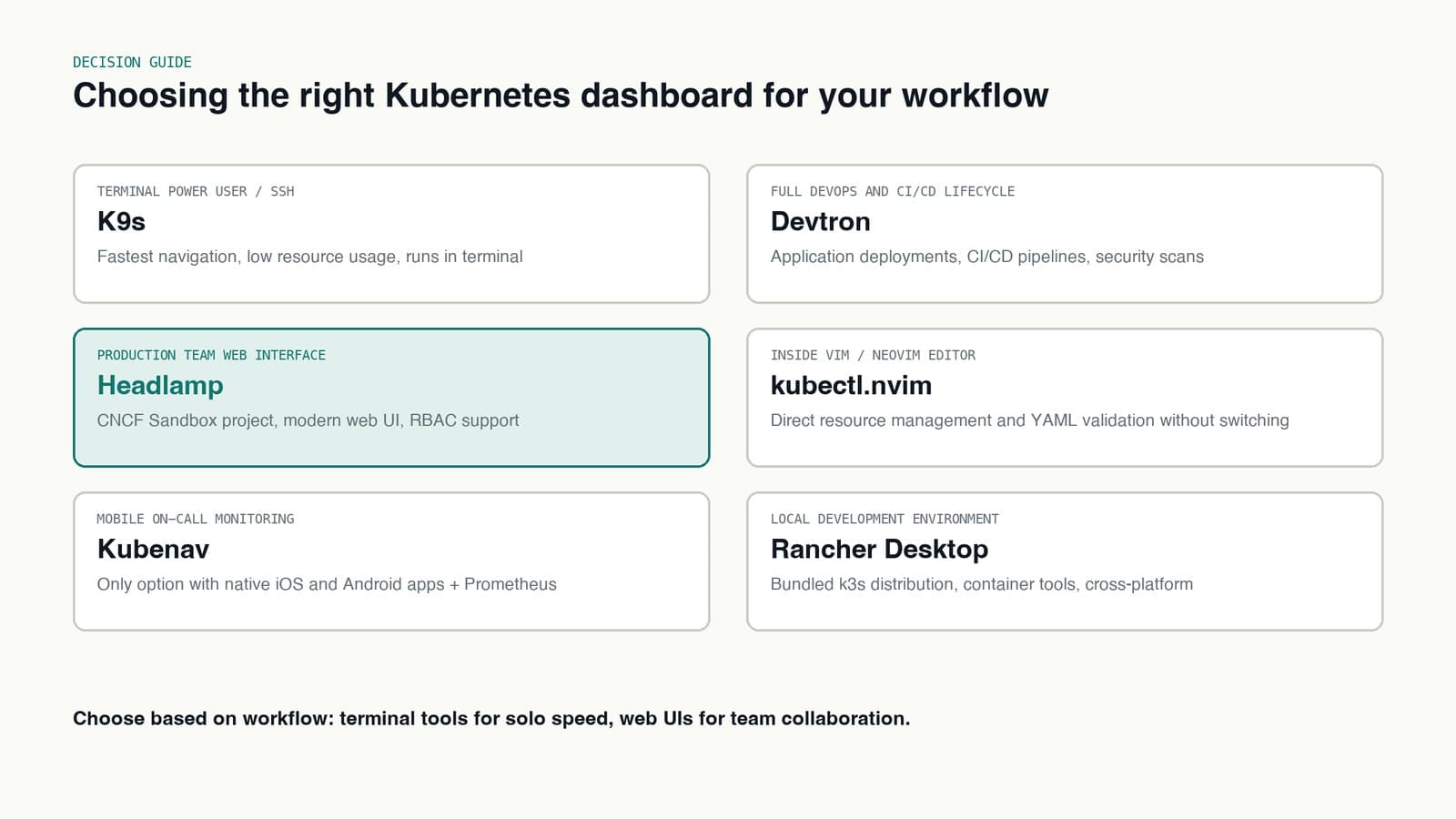
Pick based on how your team works:
- For terminal users: K9s is the fastest option
- For Vim users: kubectl.nvim lets you stay in your editor
- For teams needing a web interface: Headlamp is the most production-ready option
- For mixed container environments: Portainer manages Docker and Kubernetes from one place
- For local development: Rancher Desktop bundles everything you need
- For on-call monitoring from your phone: Kubenav is the only option with mobile apps
- For DevOps-focused teams: Devtron handles the full application lifecycle
- For security-focused operations: Karpor specializes in security visualization
- For beginners: Seabird or Cyclops keep things simple
- For managing multiple clusters: KubeClipper is built for that
The future of Kubernetes dashboards
The Kubernetes ecosystem keeps moving. As Kubernetes matures, dashboards are adding better security and compliance monitoring, closer GitOps integration, AI-assisted anomaly detection, and tighter service mesh support. Expect more tools to target specific niches rather than trying to do everything.
My personal setup
After months of testing, here's what I actually use:
- K9s: My daily driver for quick cluster checks and debugging. Nothing beats the speed of terminal-based navigation.
- Headlamp: Deployed in-cluster for team members who prefer a web UI. The CNCF backing gives me confidence in its longevity.
- Kubenav: On my phone for weekend on-call monitoring. Being able to check pod status from anywhere is useful.
Migration path from OpenLens
If you're currently on OpenLens, here's my recommended path:
- Try Freelens first: It's the closest thing to OpenLens and requires minimal adjustment
- Learn K9s on the side: Even if you stick with a GUI, K9s will make you faster
- Evaluate Headlamp for team use: If you need shared access, it's the most production-ready web option
Final thoughts
The death of OpenLens is a net positive for the ecosystem. The options available now are more diverse than a year ago, and most of them are genuinely good.
Don't just pick one. Try a few. Most are open-source and install in minutes. Knowing multiple tools matters when a 3 AM incident happens and your usual dashboard isn't cutting it.
What's your Kubernetes dashboard of choice? Have you found anything I missed? Let me know in the comments!