
- Authors

- Name
- Nadim Tuhin
- @nadimtuhin
On this page
Note: The configurations shown are based on real-world production implementations but have been generalized for educational purposes. Adapt these to your specific requirements and always test in a staging environment first.
When you're running a high-traffic WordPress multisite serving millions of users, security is not a checkbox. It's a foundation.
In this post, I'll walk through a complete security implementation, from basic nginx configurations to advanced attack prevention. Whether you're running WordPress or any web application, you'll find practical measures you can put in place today.
The challenge
Consider a WordPress multisite serving content in multiple languages:
- Main site (English):
/ - Secondary language:
/lang1 - Tertiary language:
/lang2
Each site needs its own security considerations while maintaining consistent protection across the platform. High-traffic sites typically face these challenges:
High-value target: Popular sites are constantly targeted by automated vulnerability scanners, malicious bots, SQL injection attempts, and brute force login attacks.
Performance impact: Security scanning tools cause high server CPU usage from repeated scanning, increased bandwidth consumption, slower response times for legitimate users, and occasional timeouts during peak scan periods.
Multilingual complexity: Managing security across multiple sites means more entry points to protect, complex URL patterns to secure, and maintaining consistent rules across all language variants.
WordPress-specific vulnerabilities: Plugin vulnerabilities, theme issues, core exploits, and file upload vulnerabilities.
Security implementation
Request flow through security layers
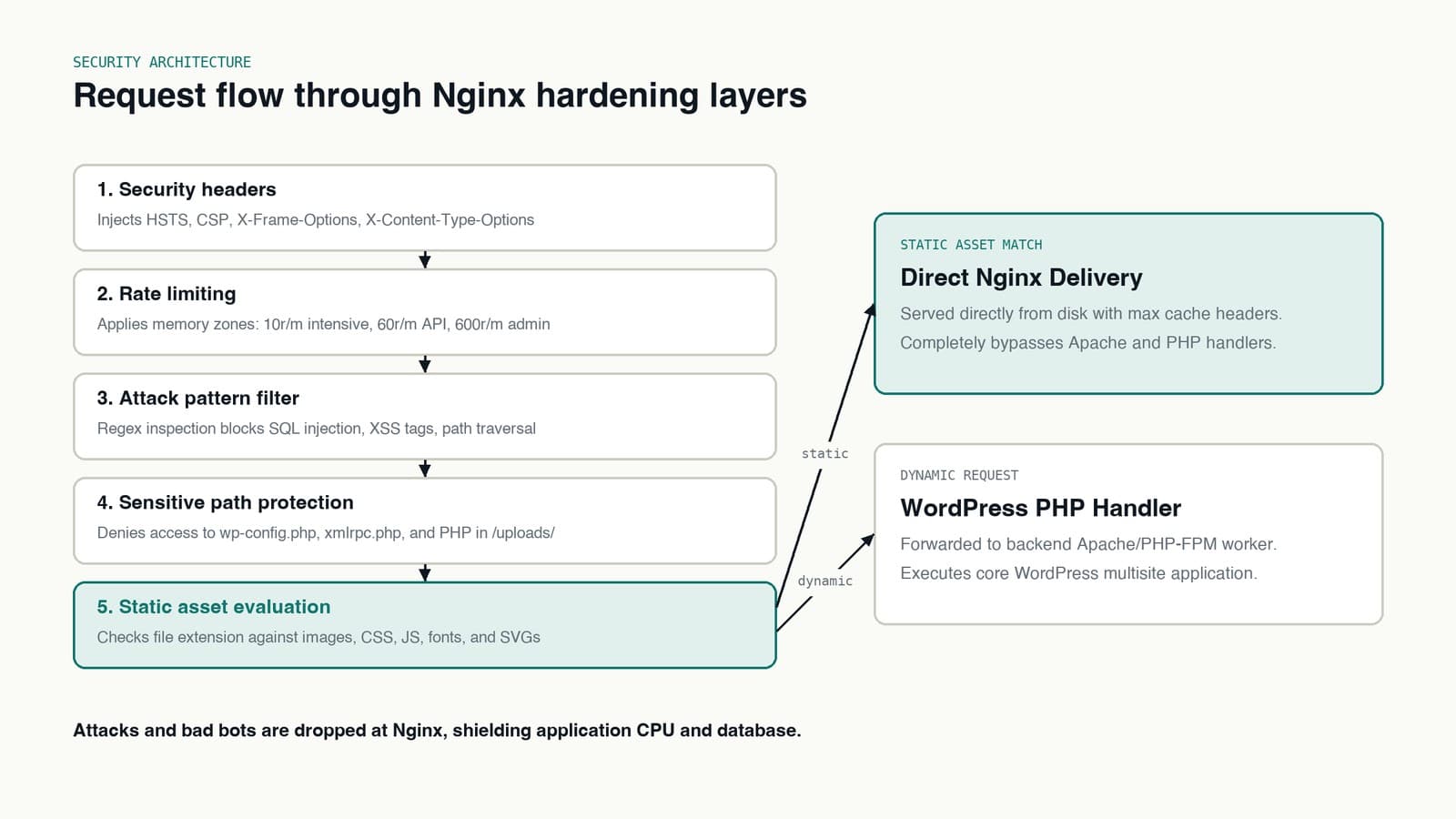
Every incoming request passes through these security layers in order:
| Layer | Check | Action on fail |
|---|---|---|
| 1. Security headers | HSTS, CSP, X-Frame-Options | Headers added to response |
| 2. Rate limiting | 60r/m API, 10r/m intensive, 600r/m admin | Request throttled |
| 3. Attack pattern filtering | SQLi, XSS, Path Traversal | 403/444 Blocked |
| 4. Path protection | wp-config.php, xmlrpc.php, /uploads/*.php | 403 Denied |
| 5. Static files? | jpg, css, js, svg | Serve directly (bypass Apache) |
If not static: Request proceeds to Apache/PHP Handler (WordPress Core)
1. Security headers
First, implement essential security headers to protect against common web vulnerabilities:
# Prevent version disclosure
server_tokens off;

# HSTS for enforcing HTTPS
add_header Strict-Transport-Security "max-age=63072000; includeSubDomains; preload" always;

# Prevent clickjacking attacks
add_header X-Frame-Options SAMEORIGIN always;

# Disable content-type sniffing
add_header X-Content-Type-Options nosniff always;

# Content Security Policy - the modern replacement for X-XSS-Protection
# Customize based on your site's requirements
add_header Content-Security-Policy "default-src 'self'; script-src 'self' 'unsafe-inline' 'unsafe-eval'; style-src 'self' 'unsafe-inline'; img-src 'self' data: https:; font-src 'self' data:; frame-ancestors 'self';" always;

# Note: X-XSS-Protection is deprecated - Chrome removed XSS Auditor in 2019
# Modern browsers ignore this header. Use Content-Security-Policy instead.
These headers are the first line of defense against common attack vectors.
Important: Always add
alwaystoadd_headerdirectives to ensure headers are sent even on error responses.
2. Basic security measures
# Prevent directory listing
autoindex off;

# Block double slash in URLs
location ~* //wp-content {
    return 403;
}

# Block hidden files (like .git, .htaccess)
location ~ /\. { deny all; }

# Handle favicon and robots.txt efficiently
location = /favicon.ico {
    log_not_found off;
    access_log off;
}

location = /robots.txt {
    allow all;
    log_not_found off;
    access_log off;
    try_files $uri /index.php?$args;
}
3. WordPress core protection
# Block XML-RPC access
location ~* "xmlrpc.php" { deny all; }
location ~* "readme.txt" { deny all; }

# Protect sensitive WordPress directories
location ~* wp-admin/includes { deny all; }
location ~* wp-includes/theme-compat/ { deny all; }
location ~* wp-includes/js/tinymce/langs/.*\.php { deny all; }

# Block access to configuration files
location ~ /(\.|wp-config.php|readme.html|license.txt) { deny all; }

# Block temp files
location ~ ~$ { access_log off; log_not_found off; deny all; }

# Block archive files
location ~* ^/(wp-content)/(.*?)\.(text|txt|zip|gz|tar|bzip2|7z)$ { deny all; }
4. Upload directory security
# Block backup directories
location ~ ^/wp-content/uploads/sucuri { deny all; }
location ~ ^/wp-content/updraft { deny all; }

# Protect plugin/theme documentation
location ~* ^/wp-content/plugins/.+\.(txt|log|md)$ {
    deny all;
    error_page 403 =404 / ;
}

# Secure multisite uploads
location ~* ^/wp-content/uploads/sites/\d+/ {
    try_files $uri $uri/ /index.php?$args;
    location ~ \.php$ {
        deny all;
    }
}

# Block PHP execution in uploads
location ~* /wp-content/uploads/.*\.php$ {
    deny all;
}

# Block restricted file types in uploads
location ~* ^/wp-content/uploads/.*.(html|htm|shtml|php|js|swf|css)$ {
    add_header X-Block-Reason "Restricted Upload File Type" always;
    deny all;
    error_page 403 =404 / ;
}
5. Attack prevention
SQL injection protection
Caveat: Regex-based SQL injection detection at the nginx level is a defense-in-depth measure, not a primary protection. It can produce false positives (blocking legitimate content containing words like "select" or "union") and is easily bypassed with encoding tricks. Always use parameterized queries/prepared statements as your primary defense.
# Block obvious SQL injection attempts
# Note: This catches common automated attacks but is NOT a substitute for
# proper input validation and parameterized queries in your application
location ~* "(\%27|\')(\%20|\s)*(or|and|union|select|insert|drop|delete|update|exec|execute)(\%20|\s)" {
    add_header X-Block-Reason "SQL Injection Attempt" always;
    deny all;
}
Path traversal prevention
# Block path traversal attempts
location ~ "(\\|\.\.\.|\.\.\/|~|`|<|>|\|)" {
    add_header X-Block-Reason "Path Traversal" always;
    deny all;
}
File inclusion and CGI protection
# Block sensitive file extensions
location ~* \.(engine|inc|info|install|make|module|profile|test|po|sh|.*sql|theme|tpl(\.php)?|xtmpl)$ {
    add_header X-Block-Reason "Sensitive File Extension" always;
    return 444;
}

# Block CGI execution
location ~* \.(pl|cgi|py|sh|lua)$ {
    add_header X-Block-Reason "CGI/Script Execution Not Allowed" always;
    return 444;
}
Documentation and backup protection
# Block access to documentation files
location ~* "/(^$|readme|license|example|README|LEGALNOTICE|INSTALLATION|CHANGELOG)\.(txt|html|md)" {
    add_header X-Block-Reason "Documentation File Protected" always;
    deny all;
}

# Block access to backup files
location ~* "\.(old|orig|original|php#|php~|php_bak|save|swo|aspx?|tpl|sh|bash|bak?|cfg|cgi|dll|exe|git|hg|ini|jsp|log|mdb|out|sql|svn|swp|tar|rdf)$" {
    add_header X-Block-Reason "Backup/Log File Protected" always;
    deny all;
}
XSS and command injection protection
Important: Content-Security-Policy headers (configured above) are your primary XSS defense. These nginx rules are supplementary blocking for obvious attack patterns.
# Block script tag injection attempts
# Catches common XSS patterns with URL encoding variations
location ~* "(<|%3C)\s*script.*?(>|%3E)" {
    add_header X-Block-Reason "XSS Attempt" always;
    deny all;
}

# Block obvious event handler injection (onerror, onload, etc.)
location ~* "(\%20|\s)(on\w+)\s*=" {
    add_header X-Block-Reason "XSS Attempt" always;
    deny all;
}
Note on command injection: Blocking shell metacharacters in nginx location blocks is generally not recommended as it can break legitimate URLs containing common characters like
:(ports, protocols),%(URL encoding), or;(query parameters). Implement command injection protection in your application layer with proper input validation and avoid shell execution where possible.
Performance optimization
Security was the primary focus, but we also added performance optimizations to keep content delivery fast.
1. Direct static file serving
Instead of proxying to Apache, serve static files directly through nginx:
# Multilingual static asset handling
location ~* ^/(bn|np)?/.*\.(jpg|jpeg|png|gif|ico|css|js|svg|woff2)$ {
    access_log off;
    expires max;
    add_header Cache-Control "public, no-transform";
    add_header X-Static-File "true";
    try_files $uri $uri/ =404;
}
This handles files for all language variants, caches aggressively, bypasses Apache completely for static content, and reduces server load.
2. WordPress content optimization
# WordPress content handling
location ~* ^/(bn|np)?/wp-content/ {
    access_log off;
    expires max;
    add_header Cache-Control "public, no-transform";
    add_header X-Static-File "true";
    try_files $uri $uri/ =404;
}
Dealing with bounty hunters and security scanners
One persistent challenge for high-traffic sites is the load from bug bounty hunters and automated scanners. Popular websites attract automated vulnerability scans, security researchers testing for issues, and penetration testing tools running continuous checks.
These activities create significant server load and occasionally affect site performance. The security rules above help by blocking malicious patterns at the nginx level before they reach the application server, which means fewer resources wasted and better response times for real users.
Expected results
After implementing these security measures, you should see:
- Reduced attack surface: Common attack vectors blocked before they reach your application
- Better performance: Blocking malicious requests early in the cycle keeps response times stable
- Lower server load: Bad bots and attacks handled at the nginx level, not the application layer
- Improved SEO: Proper security headers can help rankings, and search engines favor secure sites
These configurations are tested in production environments serving thousands of users daily.
Rate limiting
To protect against abuse and DDoS attacks, implement comprehensive rate limiting:
# Define memory zones and rates for different request types
# Format: limit_req_zone $identifier zone=name:size rate=r/time_unit;

# General API requests
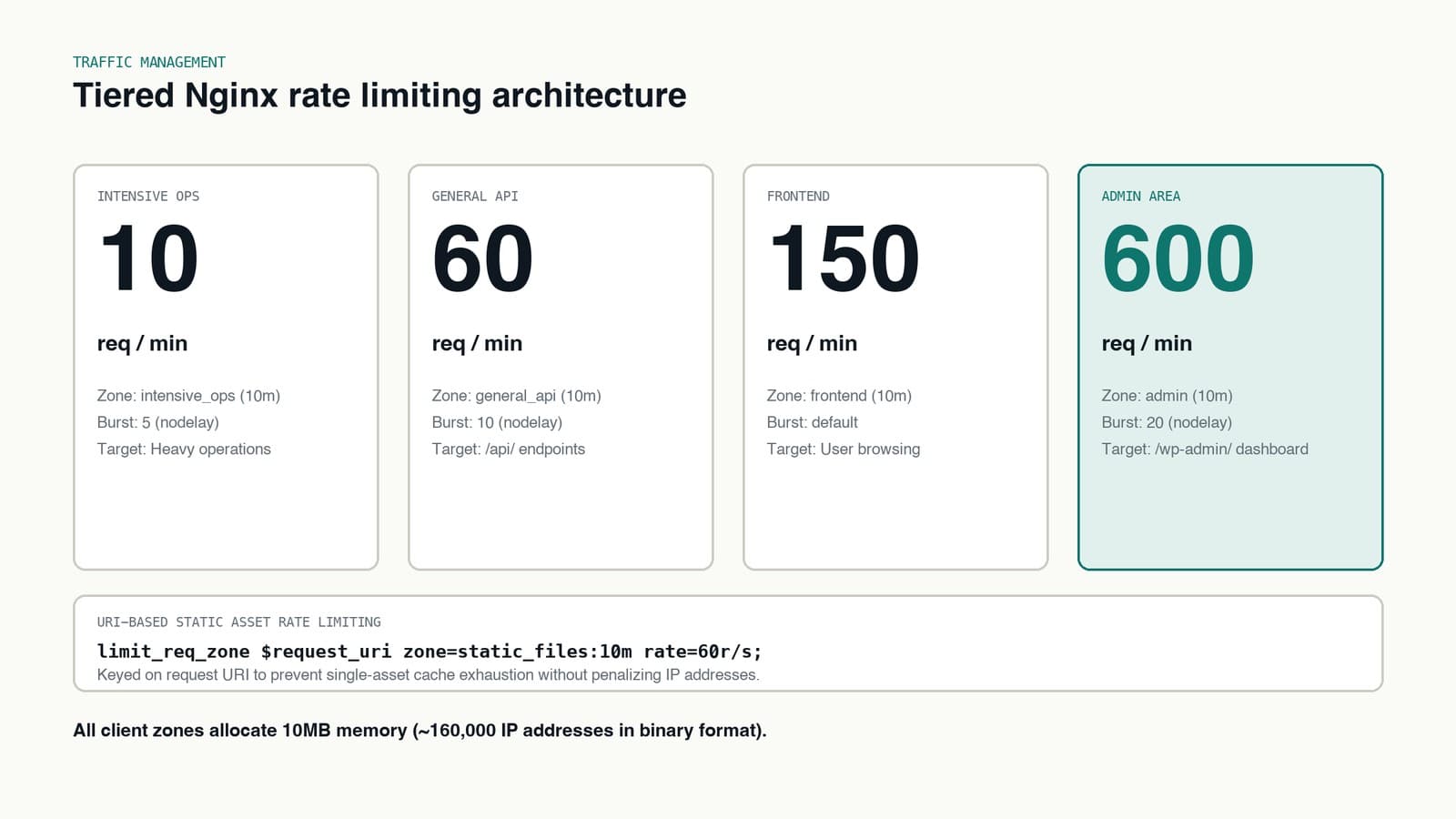
limit_req_zone $binary_remote_addr zone=general_api:10m rate=60r/m;

# Resource-intensive operations
limit_req_zone $binary_remote_addr zone=intensive_ops:10m rate=10r/m;

# Static file access
limit_req_zone $request_uri zone=static_files:10m rate=60r/s;

# Frontend requests
limit_req_zone $binary_remote_addr zone=frontend:10m rate=150r/m;

# Admin area requests
limit_req_zone $binary_remote_addr zone=admin:10m rate=600r/m;
This gives you a tiered approach: low rate (10r/m) for resource-intensive operations, medium (60r/m) for general API endpoints, high (150r/m) for frontend requests, very high (600r/m) for admin operations, and URI-based limiting (60r/s) for static resources.
Apply these limits in your location blocks:
# Example: Applying rate limits to different endpoints

# Resource-intensive endpoint
location /api/resource-heavy {
    limit_req zone=intensive_ops burst=5 nodelay;
    # ... rest of your configuration
}

# General API endpoint
location /api/ {
    limit_req zone=general_api burst=10 nodelay;
    # ... rest of your configuration
}

# Admin area
location /wp-admin/ {
    limit_req zone=admin burst=20 nodelay;
    # ... rest of your configuration
}
Testing and verification
Here's a template for testing your security implementation:
Basic access testing:
# Test homepage access
curl -I https://your-domain.com/

# Test subsite access (if using multisite)
curl -I https://your-domain.com/site1/
curl -I https://your-domain.com/site2/
Security rule testing:
# Test file execution protection
curl -I "https://your-domain.com/wp-content/uploads/test.php"
curl -I "https://your-domain.com/wp-content/themes/test.php"

# Test SQL injection protection
curl "https://your-domain.com/?id=1%27%20or%201=1"
curl "https://your-domain.com/?user=admin%27%20union%20select"

# Test path traversal protection
curl -I "https://your-domain.com/wp-content/plugins/../../../etc/passwd"

# Test sensitive file protection
curl -I "https://your-domain.com/wp-config.php"
curl -I "https://your-domain.com/.env"
Rate limit testing:
# Function to test rate limits
test_rate_limit() {
    local endpoint=$1
    local requests=$2
    local delay=${3:-0}

    echo "Testing rate limit for $endpoint"
    for i in $(seq 1 $requests); do
        curl -I "$endpoint" &>/dev/null
        echo -n "."
        sleep $delay
    done
    echo "Done!"

    # Final request to check if rate limit is triggered
    curl -I "$endpoint"
}

# Example usage:
# test_rate_limit "https://your-domain.com/api/" 100 0.1
# test_rate_limit "https://your-domain.com/wp-admin/" 50 0.2
Bot detection testing:
# Test with different User-Agents
curl -I -A "Googlebot/2.1 (+http://www.google.com/bot.html)" https://your-domain.com/
curl -I -A "facebookexternalhit/1.1" https://your-domain.com/
curl -I -A "Mozilla/5.0 (compatible; Bingbot/2.0)" https://your-domain.com/
Remember to:
- Replace
your-domain.comwith your actual domain - Adjust request numbers and delays based on your rate limits
- Test from different IP addresses to verify IP-based limits
- Run tests in a staging environment first
- Monitor logs while testing to verify proper blocking
Maintenance best practices
To keep your security implementation effective:
- Monitor logs: Regularly check nginx error logs for blocked attempts
- Update rules: Keep security rules current with new threat patterns
- Test after updates: Verify security measures after WordPress core/plugin updates
- Review rate limits: Adjust rate limiting based on traffic patterns
- Audit bot access: Monitor and update bot detection patterns
Defense-in-depth model
Security layers between attacker and WordPress application:
| Layer | Protection | Components |
|---|---|---|
| 1. Transport security | Encrypt & hide server info | HSTS (force HTTPS), TLS 1.2+ only, server_tokens off |
| 2. Rate limiting | Throttle excessive requests | 60r/m general API, 10r/m intensive ops, burst handling with nodelay |
| 3. Input filtering | Block malicious payloads | SQL injection patterns, XSS script tags, path traversal (../) |
| 4. Access control | Restrict sensitive paths | Block xmlrpc.php, protect wp-config.php, deny hidden files (.git, .env), block PHP in /uploads/ |
| 5. Response headers | Harden browser behavior | Content-Security-Policy, X-Frame-Options: SAMEORIGIN, X-Content-Type-Options: nosniff |
Outcomes:
- Malicious requests Blocked or Blocked/Logged
- Legitimate requests Protected App
Adapt these configurations to your specific needs and test them regularly.