- Published on
My AI coding agent setup: MacBook Pro to control, Windows PC to run, Herdr to connect, 9Router to route

- Authors

- Name
- Nadim Tuhin
- @nadimtuhin
On this page
For a while my laptop was doing everything: running the agents, holding the repos, keeping every terminal alive. Close the lid and the work stopped. Lose Wi-Fi and the work stopped. Hit a rate limit on one account and the work stopped.
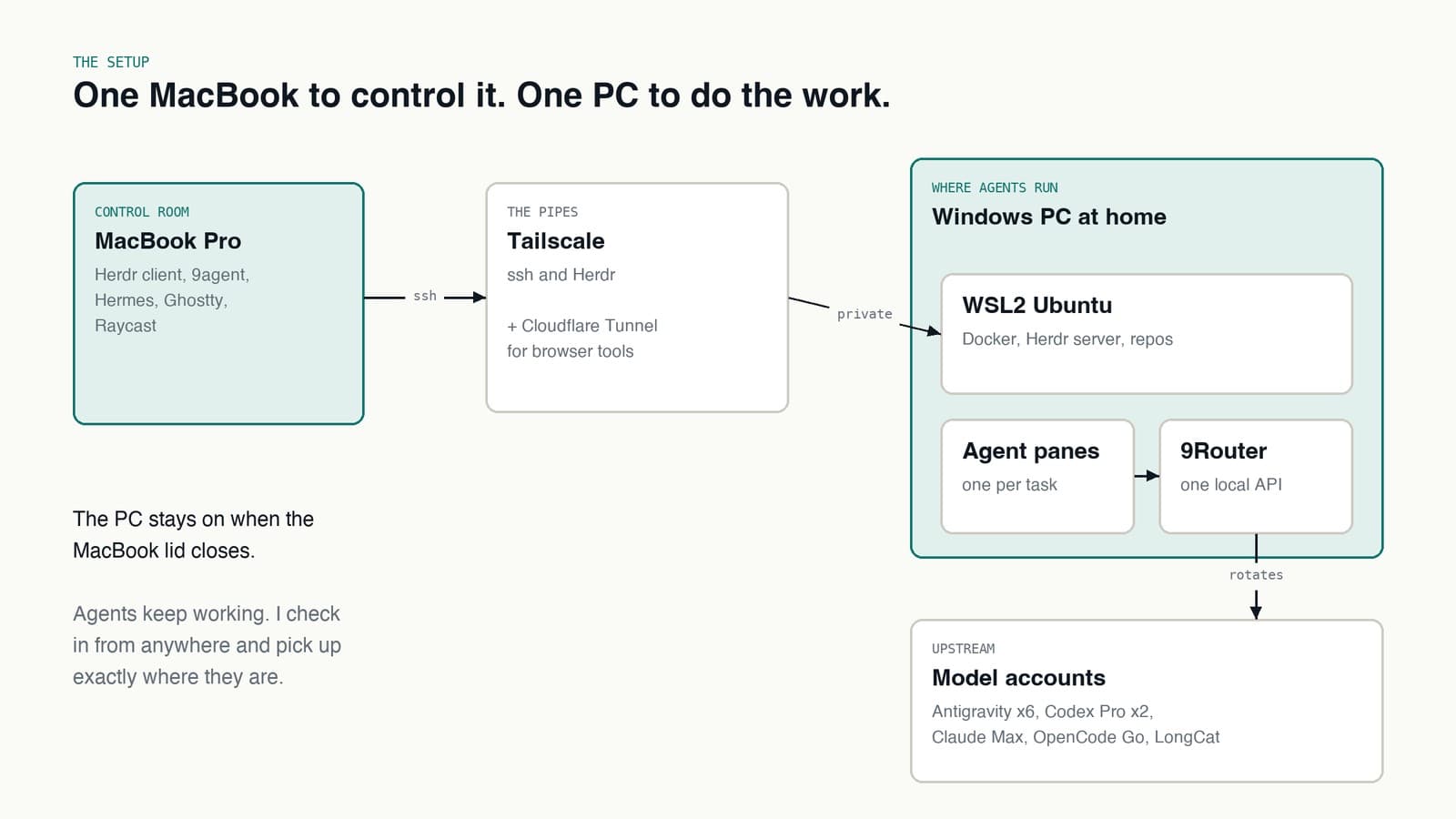
So I split it. My MacBook Pro is now the control room: where I type, plan, watch and review. A Windows PC at home is where the agents run. This post is the setup, piece by piece.
Each piece also has its own deep dive:
- Tailscale and Cloudflare Tunnel: reaching my home PC from anywhere with zero open ports
- Herdr: how my MacBook Pro connects to Ubuntu terminals on a Windows PC
- 9Router: one local endpoint in front of every AI coding account I have
- 9agent: run Claude Code, Pi or Hermes on any model with one command
- Hermes: the agent that runs my setup while I sleep, and learns from every correction
The MacBook Pro: where I control everything
The MacBook Pro does not run the heavy work anymore. It runs the things I touch:
- The Herdr client, connected to the Ubuntu terminals on the PC
- 9agent, to start a new agent against any model with one command
- Hermes, for scheduled jobs and the assistant I talk to all day
- Ghostty and Raycast, so getting to any of it is a keystroke away
Because nothing heavy runs locally, the battery lasts, the fans stay quiet, and closing the lid is free. Everything I need is a terminal pane away, wherever I am.
The PC that does the work
It is a normal Windows desktop. Inside it, WSL2 runs Ubuntu, and Ubuntu runs Docker, the repos and every agent process.
Two rules keep it boring:
- Docker runs inside Ubuntu, not Docker Desktop. One engine, managed by systemd, no surprises after a Windows update.
- Every container has a memory and CPU limit. 16 GB goes fast when several agents and a browser run at once. Limits mean one runaway process cannot take the rest down.
The one WSL2 trap worth knowing: Windows shuts the Ubuntu VM down when nothing is attached to it. Every service vanishes with it. A small keepalive on the Windows side fixes that.
Getting in from anywhere: Tailscale and Cloudflare Tunnel
I do not open any ports on my home router. Instead there are two paths in, each for a different job.
- Tailscale for my own devices. It puts the MacBook Pro and the PC on a private network, so
ssh homelabworks the same from home, a cafe or a hotel. Herdr and 9Router ride on that connection. Nothing about it is public. - Cloudflare Tunnel for the browser.
cloudflaredon the PC makes an outbound connection to Cloudflare, which serves a browser editor and a view of a running browser on my own subdomains. Cloudflare Access asks me to sign in before any request reaches the PC.
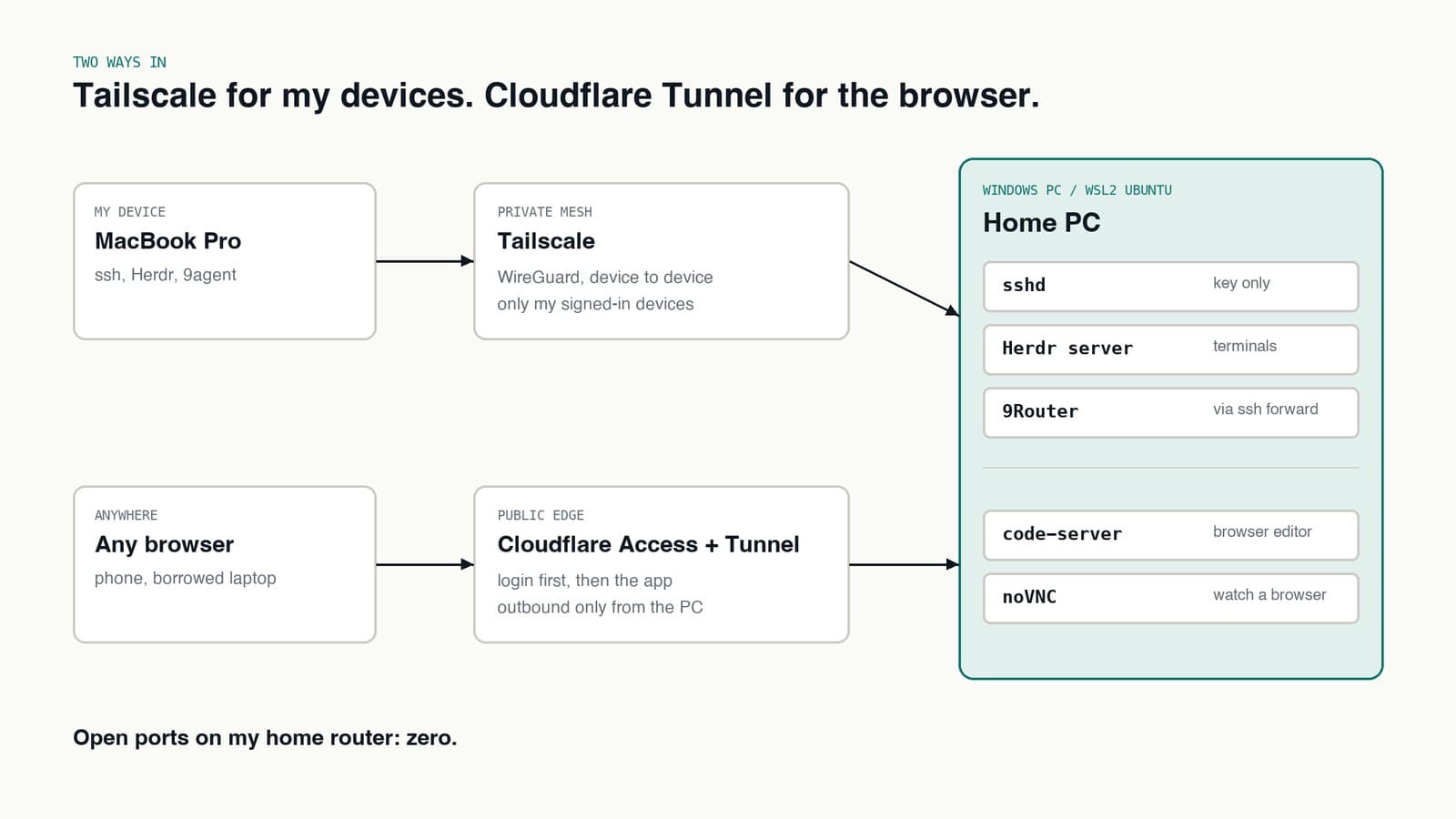
The rule: if it is interactive and powerful, it goes over Tailscale. If it is a web page I might open from a phone, it goes through Cloudflare with a login in front.
More on this: Tailscale, Cloudflare Tunnel and the things that bit me.
Herdr: my terminals on the PC, from the MacBook
Herdr is how the MacBook Pro gets into the PC. The Herdr server runs inside WSL2 Ubuntu on the Windows machine. The Herdr client runs on the MacBook and connects to it over ssh on Tailscale. What I get is the PC's Ubuntu terminals, split into panes and tabs, as if they were local.
Each task gets its own pane, usually in its own git worktree. Agents run in those panes on the PC, not on the MacBook.
And because the terminals live on the PC, closing the MacBook does not kill anything. I reconnect later, from the same MacBook or from somewhere else, and every pane is exactly where I left it.
More on this: how I use Herdr to reach the PC's terminals.
9Router: many accounts, one endpoint
Every agent CLI I use, Claude Code, Codex, Pi, OpenCode, talks to one URL: localhost:20128/v1. That is 9Router, a self-hosted gateway that speaks the OpenAI-style API and fans out to real providers behind it.
Behind it sit:
- 6 Antigravity accounts for the bulk of the work and long agent loops
- 2 Codex Pro subscriptions for a second opinion with different blind spots
- 1 Claude Max subscription for the hard calls and final review
- OpenCode Go for open models (GLM, Kimi, Qwen, DeepSeek, MiniMax) on one flat subscription
- LongCat as a cheap fallback and as the judge in fusion combos
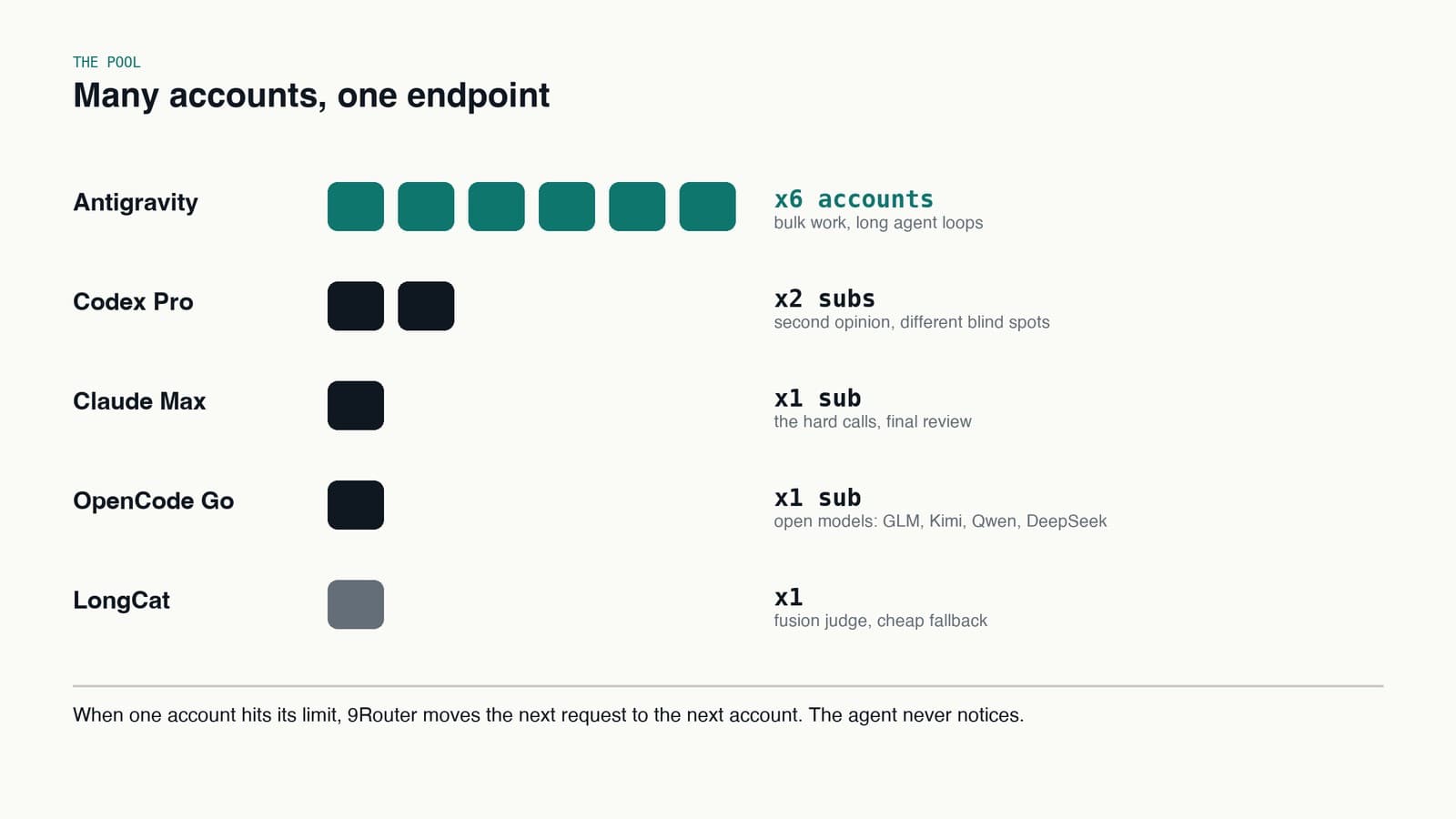
The agents never pick an account. They ask for a model name, which in 9Router is usually a combo: a named group of models with a strategy.
- Fallback: try the first model, move to the next if it fails or is rate limited.
- Round robin: spread requests evenly across accounts.
- Fusion: send the same prompt to a small panel, then let a judge model pick or merge the best answer.
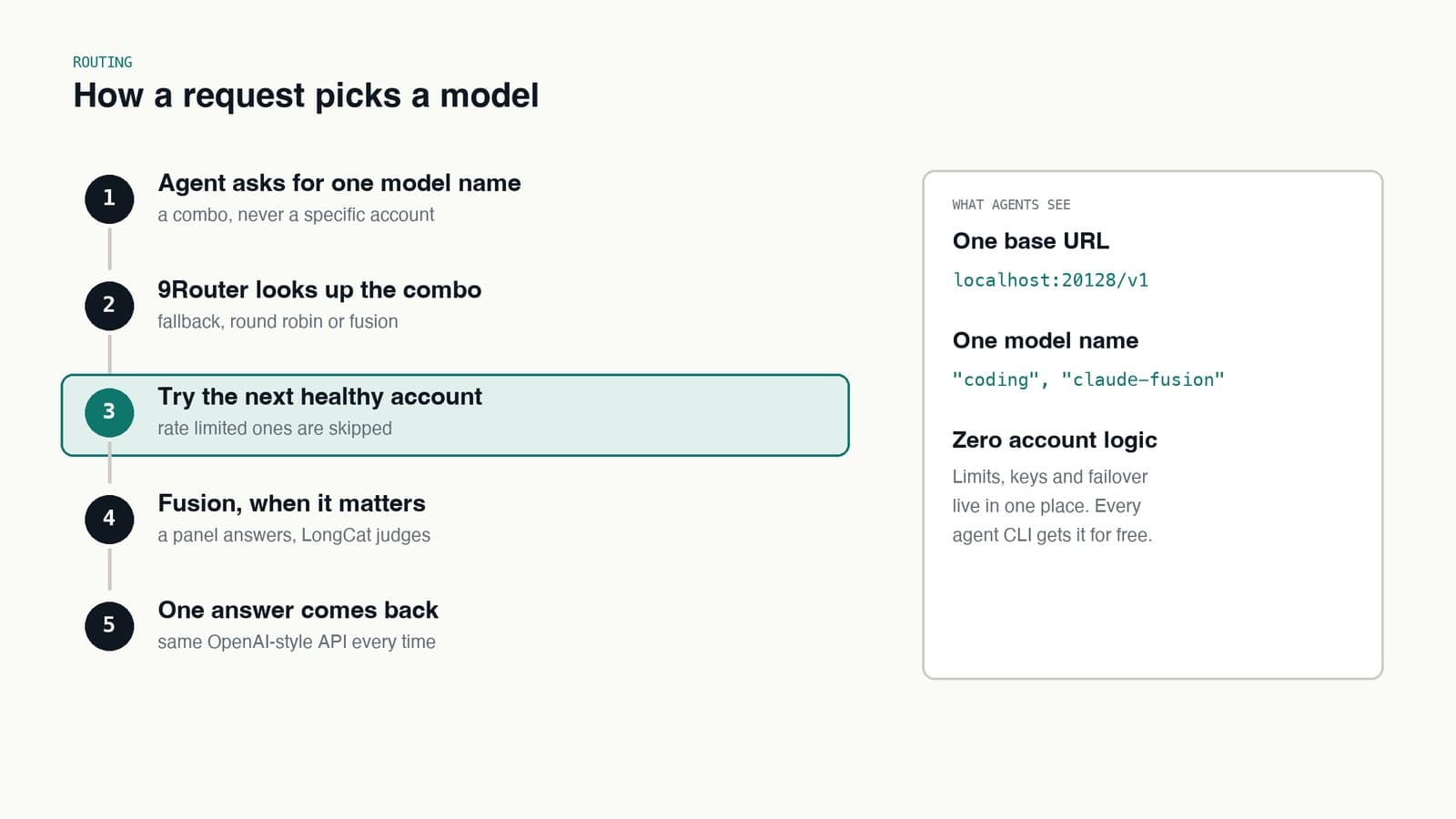
When one account hits its limit, 9Router moves the next request to the next account. The agent never notices. Six Antigravity accounts means six chances before anything falls through to a paid fallback.
More on this: 9Router, combos and keeping the model list fresh.
9agent: 9Router models inside Claude Code
Claude Code expects to talk to Anthropic. It does not need to. I wrote 9agent, a small launcher that reads the model list from 9Router, lets me pick an agent, a model and a permission mode, then starts the agent pointed at the gateway.
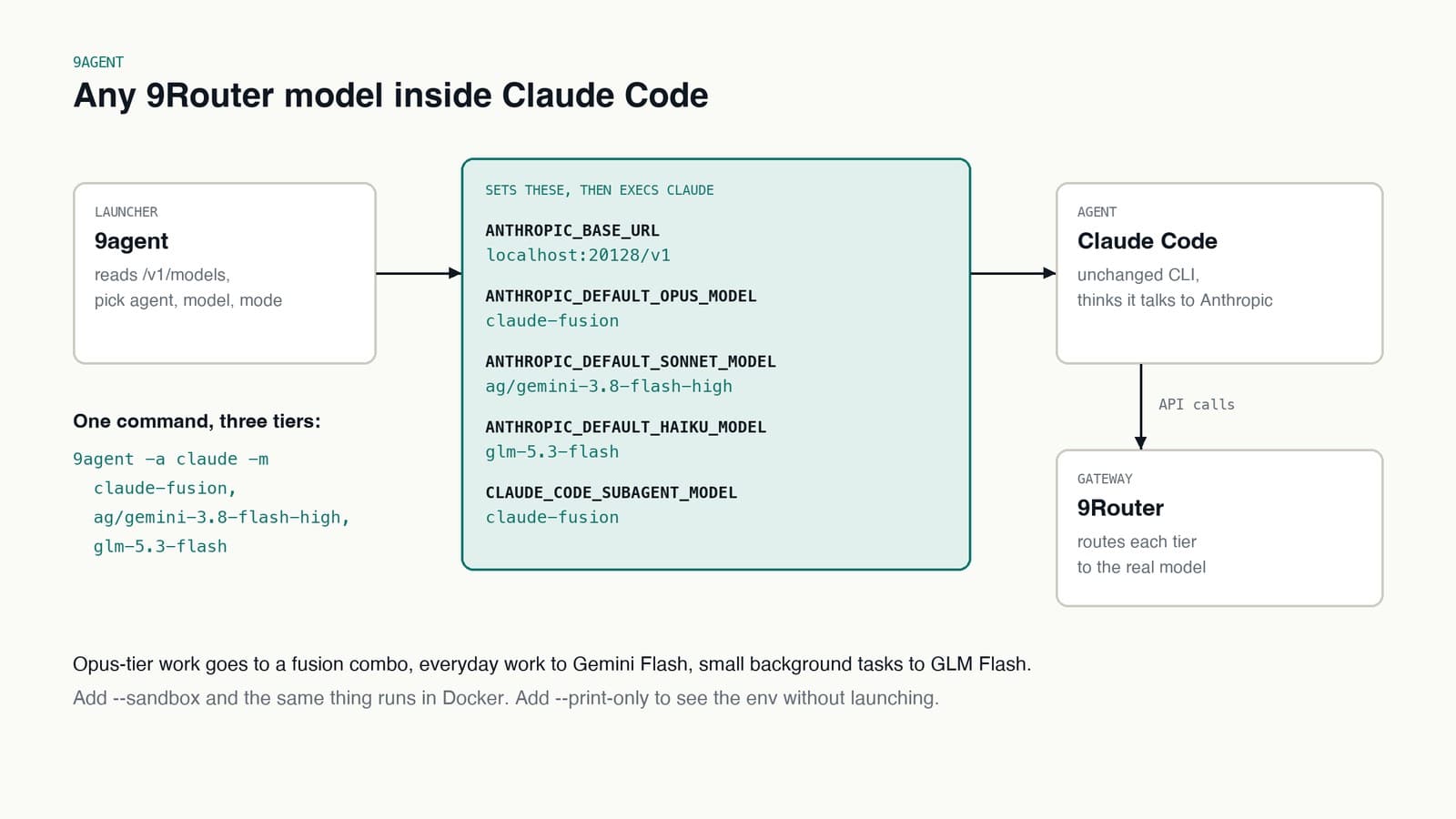
For Claude Code it sets a handful of environment variables and gets out of the way:
9agent -a claude -m claude-fusion,ag/gemini-3.8-flash-high,glm-5.3-flash
ANTHROPIC_BASE_URL=http://localhost:20128/v1
ANTHROPIC_DEFAULT_OPUS_MODEL=claude-fusion
ANTHROPIC_DEFAULT_SONNET_MODEL=ag/gemini-3.8-flash-high
ANTHROPIC_DEFAULT_HAIKU_MODEL=glm-5.3-flash
CLAUDE_CODE_SUBAGENT_MODEL=claude-fusion
Claude Code still thinks it has an Opus, a Sonnet and a Haiku. Behind them, the heavy tier is a fusion combo, the everyday tier is Gemini Flash on the Antigravity pool, and the small background calls go to GLM Flash. Same CLI, same hooks, same skills, different models.
A few flags I use constantly:
- No flags at all gives a searchable picker over everything 9Router serves.
--sandboxruns the same agent in Docker, with only the working directory mounted. It limits blast radius when I let an agent run unattended.--print-onlyprints the resolved env and command without launching. Good for checking what an agent is about to talk to.-a pior-a hermeslaunches those agents against the same gateway instead.
9agent does one thing: resolve a model, exec the agent, pass its exit code back. It never rewrites my config files and never sits in the middle of the session.
More on this: 9agent, the sandbox and its two design rules.
Fusion models
Fusion is the combo type I like most. These are the ones I actually use:
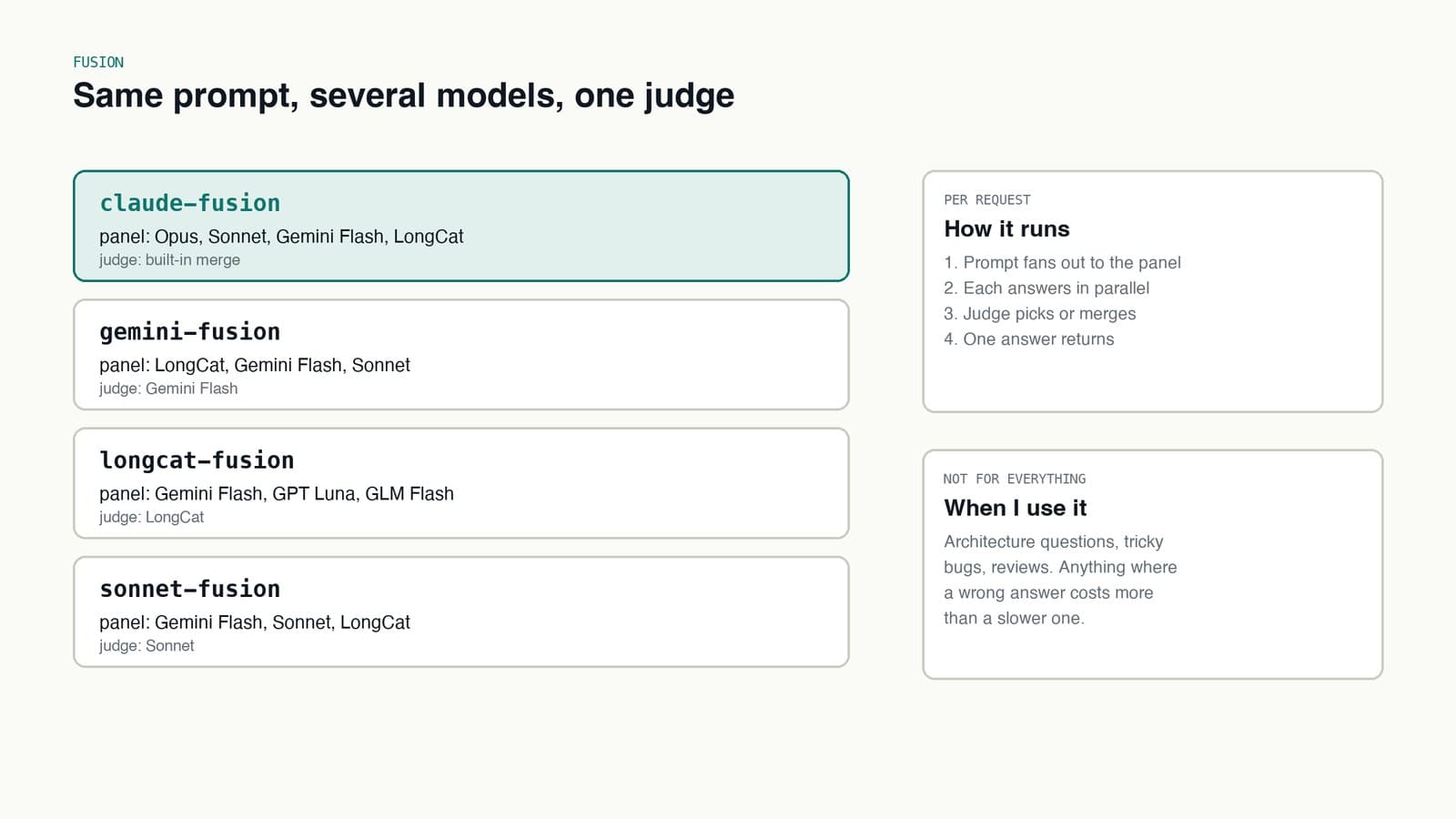
- claude-fusion: Opus, Sonnet, Gemini Flash and LongCat answer, then their answers get merged. My default for anything I would otherwise ask twice.
- gemini-fusion: LongCat, Gemini Flash and Sonnet, with Gemini Flash as judge. Fast and cheap.
- longcat-fusion: Gemini Flash, GPT Luna and GLM Flash, with LongCat as judge. Three model families, three sets of blind spots.
- sonnet-fusion: Gemini Flash, Sonnet and LongCat, with Sonnet as judge.
Fusion is slower and burns more quota, so it is not the default. I reach for it on architecture questions, bugs that already fooled one model, and reviews. Anywhere a wrong answer costs more than a slow one.
The bigger win of 9Router overall is that account logic lives in exactly one place. Keys, limits and failover are configured once. Every new agent CLI I try gets all of it by pointing at one URL.
Hermes: the agents that run when I am not there
Interactive agents are half the setup. The other half is Hermes, an agent with a scheduler, running jobs on its own.
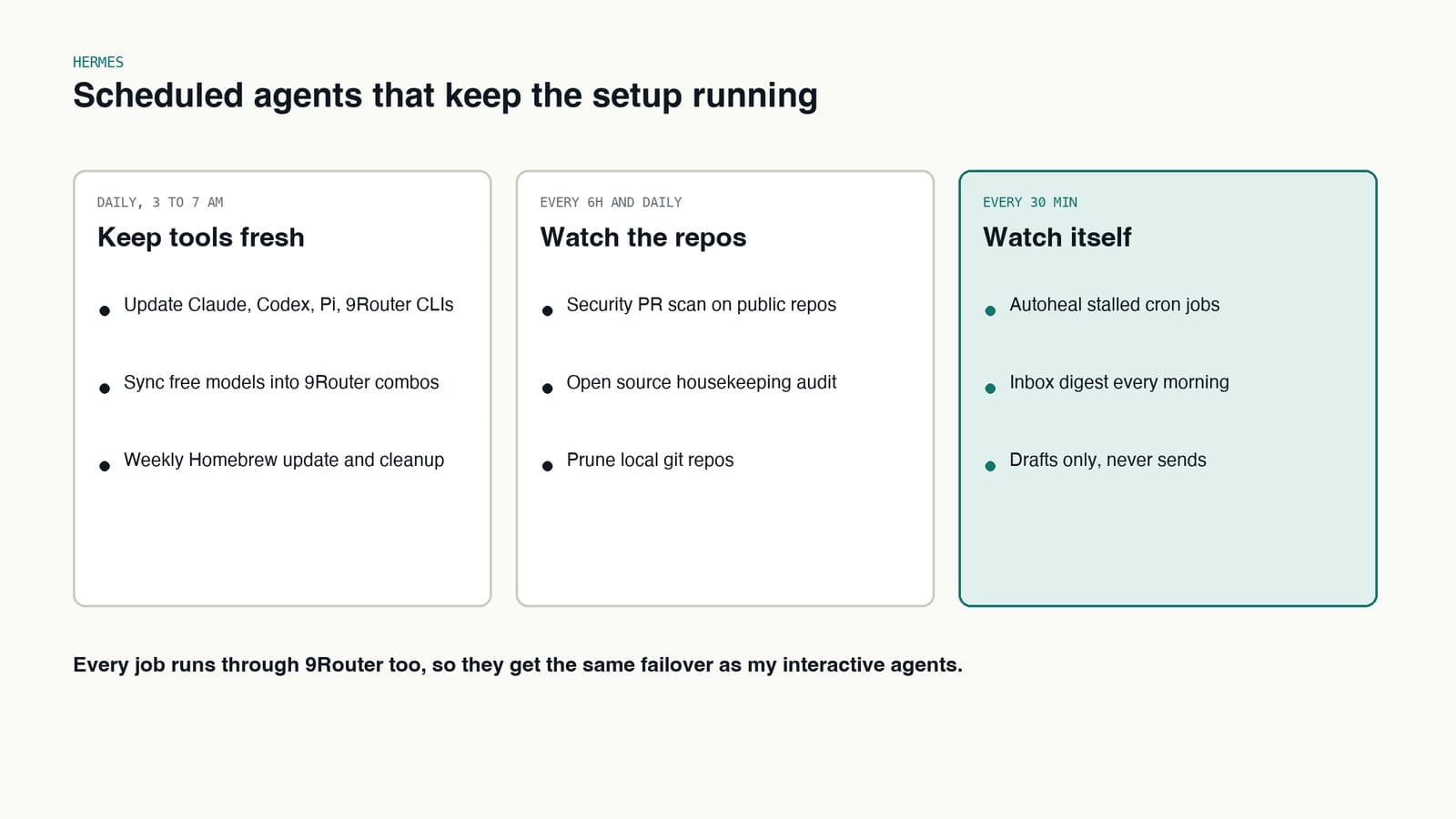
- Keep tools fresh. Every night it updates the Claude, Codex, Pi and 9Router CLIs, and syncs newly released free models into the right 9Router combos. I never wake up to a stale model list.
- Watch the repos. A security PR scan across my public repos every six hours, a daily open source housekeeping audit, and a nightly prune of local clones.
- Watch itself. An autoheal job checks every 30 minutes for scheduled jobs that stalled and restarts them.
One rule for all of it: Hermes drafts, I send. It can message me, but it never sends anything to anyone else on my behalf.
More on this: Hermes jobs, skills, memory and the one rule.
Skills: small files that teach agents how I work
The other thing that compounds is skills. A skill is a short markdown file an agent loads when a task matches it: the steps, the commands, and the pitfalls I hit last time. When an agent gets something wrong and I correct it, the fix goes into the skill, not just the chat.
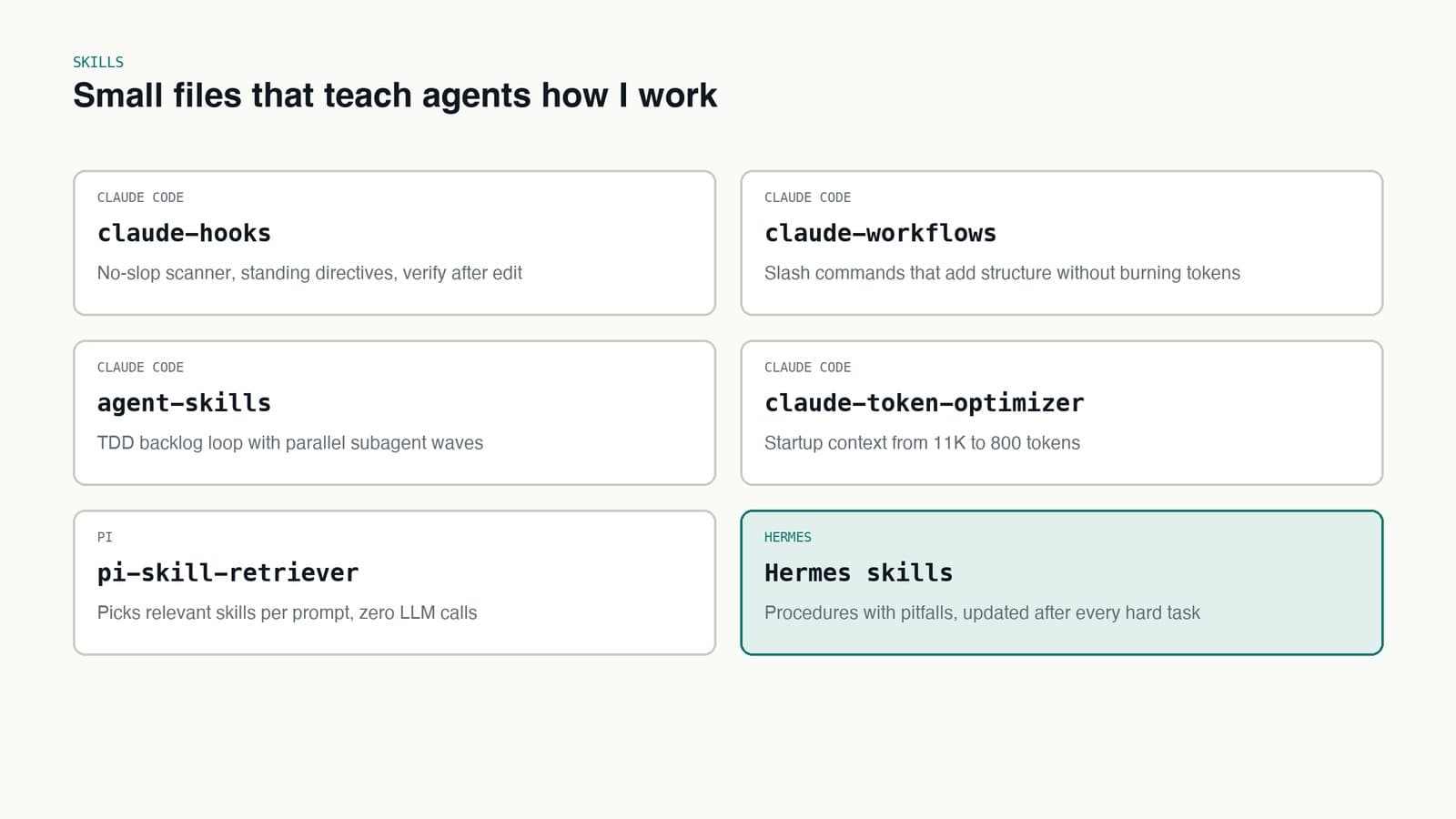
The ones that are public and worth stealing:
- claude-hooks: Claude Code hooks for standing engineering rules, a scanner that blocks AI filler, and a check after every edit.
- claude-workflows: slash commands that add structure to Claude Code without burning tokens.
- agent-skills: a TDD backlog loop that runs subagents in parallel waves.
- claude-token-optimizer: cuts Claude Code startup context from about 11K tokens to 800.
- pi-skill-retriever: picks relevant skills for each prompt in the Pi agent, with zero LLM calls.
My Hermes skills follow the same idea: one file per kind of task, each with a pitfalls section that grows every time something breaks. Those are the most valuable files on the machine.
What a day looks like
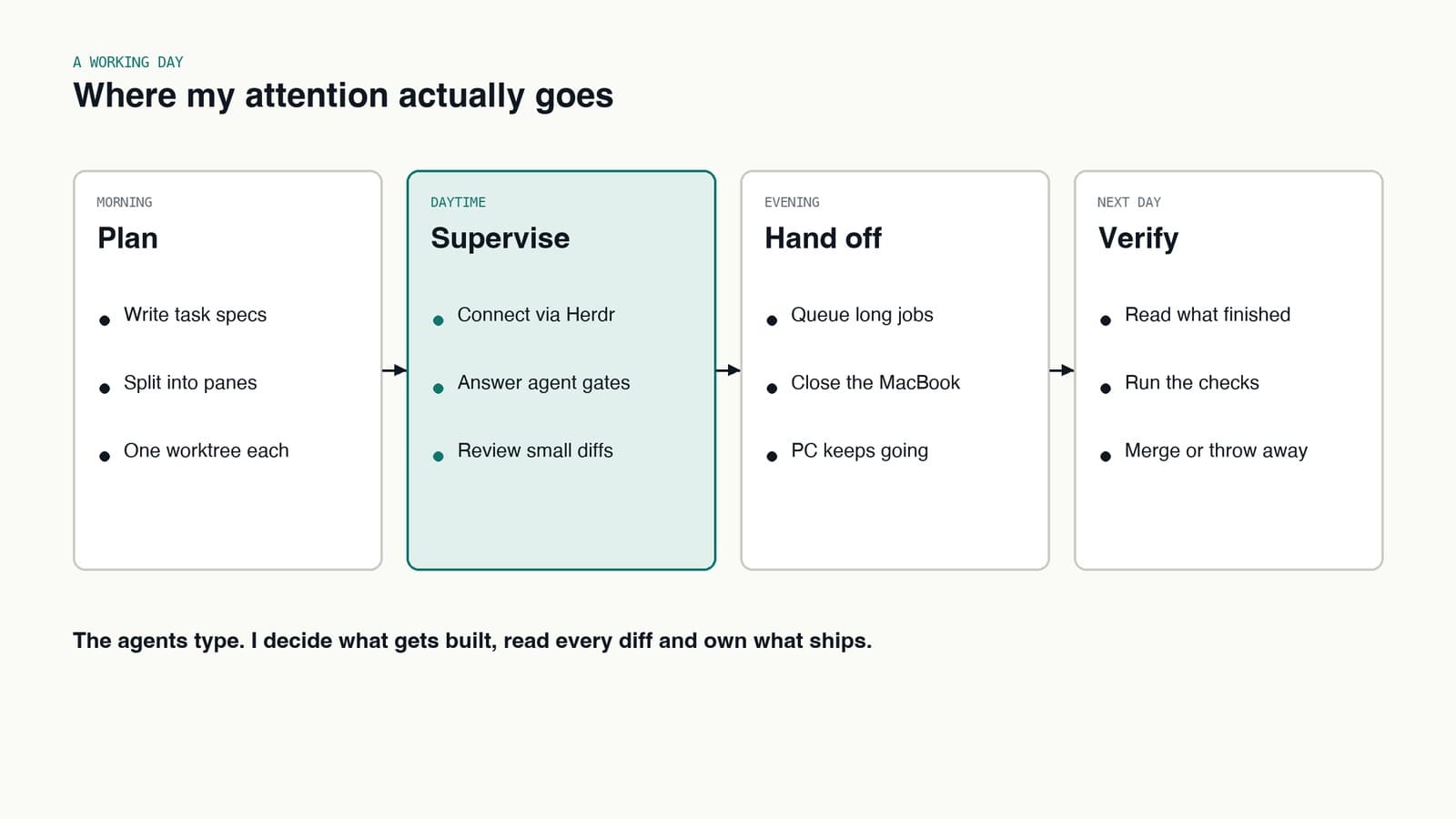
- Plan. Write short task specs. One pane and one worktree per task.
- Supervise. Connect through Herdr, answer what needs me, and review small diffs as they land.
- Hand off. Queue the long jobs in the evening and close the MacBook. The PC keeps going.
- Verify. Next morning, read what finished, run the checks, then merge it or throw it away.
The agents do the typing. I decide what gets built, read every diff and own what ships, from the MacBook. The setup just makes sure the typing never waits on its lid being open.
What I would tell someone copying this
- Separate where you type from where work runs. That one change removed most of my interruptions.
- Do not open ports. A private mesh for your devices and a tunnel with a login for the browser is less work than hardening an exposed box.
- Put a gateway in front of your models early. Once more than one tool and more than one account are involved, routing in each tool separately becomes a mess.
- Keep the terminals where the work is. If the sessions live on the machine doing the work, any device that can connect is a full workstation.
- Write the lesson down where the agent will read it. A correction in chat is gone tomorrow. A correction in a skill is there forever.