- Published on
My auto dark mode lasted 60 seconds, then saved itself as dark
- Authors

- Name
- Nadim Tuhin
- @nadimtuhin
On this page
In December 2024 I added a theme button to this blog with three modes: auto, light and dark. Auto picks light from 6 AM to 6 PM and dark the rest of the day.
It was broken for almost two years. A new visitor got the light theme for about a minute, whatever the hour. After that the site remembered a fixed theme, and auto never came back unless they clicked through the cycle again.
The original code
The site uses next-themes 0.3.0. My switch stored its mode in localStorage and started a timer when the mode was auto:
useEffect(() => {
  setMounted(true)
  const savedTheme = localStorage.getItem('theme') || 'auto'
  setTheme(savedTheme)

  if (savedTheme === 'auto') {
    const interval = setInterval(() => {
      setTheme(isDaytime() ? 'light' : 'dark')
    }, 60000)
    return () => clearInterval(interval)
  }
}, [setTheme])
The problem is the key name. next-themes stores the active theme under theme too, and it writes that key on every setTheme call. So my code and the library were writing to the same slot with different meanings. I stored a mode (auto). The library stored a resolved theme (light or dark).
What a visitor saw
I reproduced it on a production build with Playwright, with the clock set to 22:00:
- First load:
setTheme('auto')runs.autois not a theme next-themes knows, so the<html>element gets the classauto, which my Tailwind config ignores. The visitor sees the light theme at 10 PM. - 60 seconds later: the interval fires and calls
setTheme('dark'). The page turns dark, and next-themes savesdarkundertheme. - Next visit: my code reads
theme, getsdark, and never starts the interval. The visitor is now on a fixed dark theme they never picked.
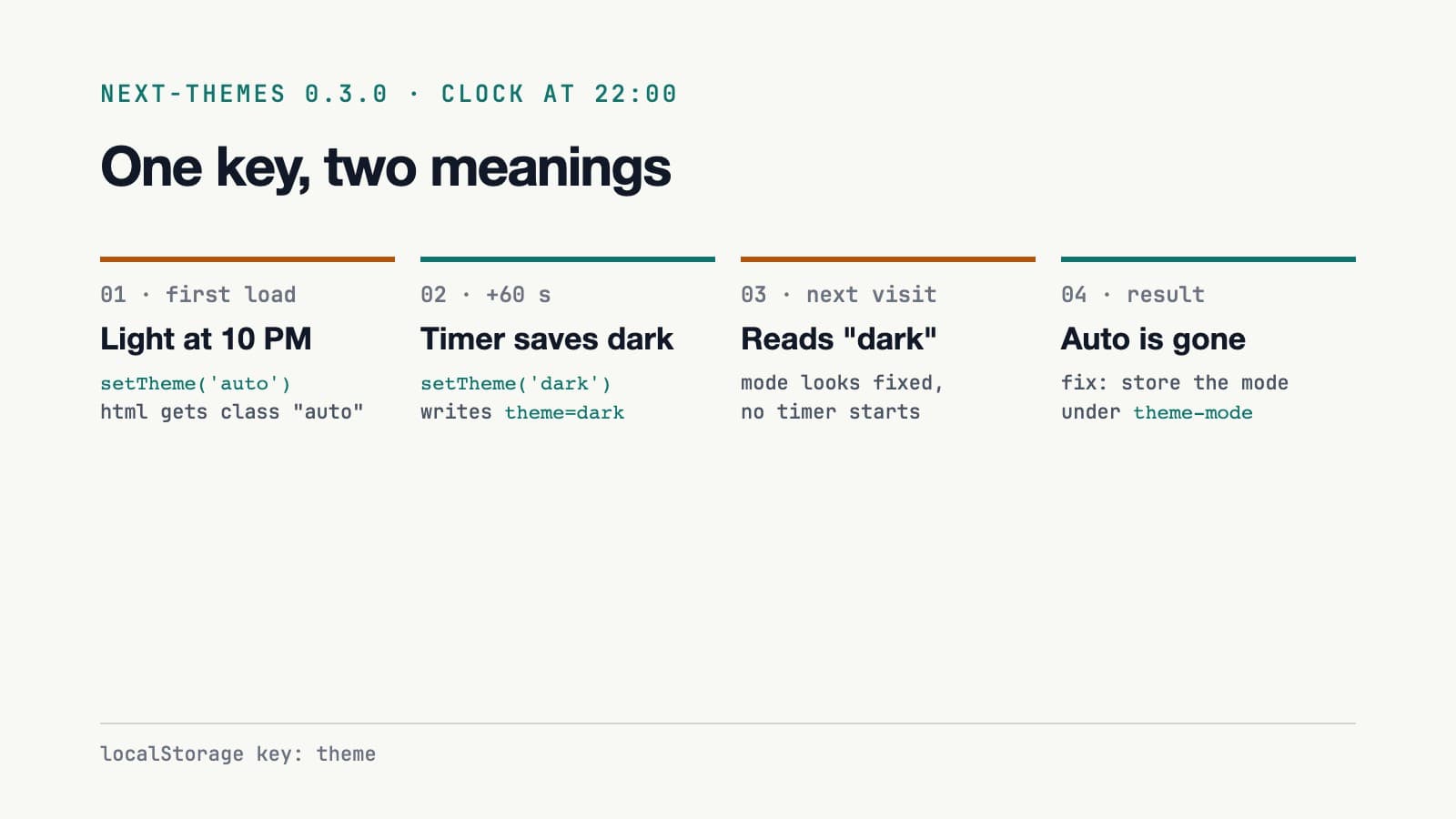
The toggle had the same confusion. It read theme from the hook to find the next mode, so after the timer fired, a click from "auto" actually started from dark.
The fix: give the mode its own key
The user's choice and the rendered theme are two different values, so they get two different keys. next-themes keeps theme. My switch stores the mode under theme-mode:
const MODE_KEY = 'theme-mode'
const NEXT_MODE = { auto: 'light', light: 'dark', dark: 'auto' }

const timeOfDayTheme = () => {
  const hours = new Date().getHours()
  return hours >= 6 && hours < 18 ? 'light' : 'dark'
}

const resolveMode = (mode) => (mode === 'auto' ? timeOfDayTheme() : mode)
The mode lives in React state. It starts as auto and is read from theme-mode after mount. One effect turns it into a real theme and only runs the timer in auto:
useEffect(() => {
  if (!mounted) return // wait for the saved mode
  setTheme(resolveMode(mode))
  if (mode !== 'auto') return
  const interval = setInterval(() => setTheme(resolveMode('auto')), 60000)
  return () => clearInterval(interval)
}, [mounted, mode, setTheme])
Two things changed. setTheme only ever receives light or dark, so there is no minute of a made-up class. And the timer can write whatever it likes to theme, because nothing reads that key to decide the mode anymore. The icon and the tooltip read mode too, so the button shows what the user picked, not what the clock resolved.
The mounted guard came from review. Without it, the effect first ran with the default auto, so someone who picked dark saw a light frame at 10 AM before their saved mode loaded.
Testing it with a fake clock
A bug that needs a specific hour and a 60-second wait does not get caught by clicking around. Playwright can install a fake clock in the page, so the test sets the time to 17:59:30 or 22:59:30 and fast-forwards:
await page.clock.install({ time: new Date(2026, 9, 14, hour, 59, 30) })
await page.goto(url)
expect('fresh visit dark', await dark(), hour < 6 || hour >= 18)

await page.clock.runFor(61_000) // cross the hour, fire the interval
await page.reload()
expect('auto survives reload', (await title()).startsWith('Automatic'), true)
expect is a small helper that prints PASS or FAIL. The full script checks seven things at each of the two hours: the first visit, the hour change, auto surviving a reload, two clicks, dark surviving a reload, and the timer leaving a manual dark alone. On the old build, 9 of the 14 checks failed. On the fixed build, all 14 pass.
Those checks all ran near 18:00 or 23:00, when auto also resolves to dark, so they could not catch the light frame. A second script loads a saved dark mode at 10:00 and a saved light mode at 22:00, records every class change on <html> with a MutationObserver, and fails if the other theme ever appears. It failed both cases before the guard and passes both after.
What I would tell past me
- Check what your library stores. next-themes documents its
storageKeyoption, which defaults totheme. My code used the same name. - Keep the choice apart from its result. "Auto" is a choice. "Dark at 22:00" is a result. Storing both under one name is how the result overwrote the choice.
- Put the clock in the test. A fake clock made a 60-second bug take under a second to reproduce.
The switch in the header of this site is the fixed version. If you have a theme toggle with an auto mode, open devtools, wait a minute, and look at localStorage.
Resources
Related posts
- BanglaABC123: a number matching game I built for my kids
My kids had exams on numbers in English and Bengali, so I built a small matching game: tap a card, hear the number, find its pair in the other script. No ads, no accounts.
- Memory Booster: a 2016 MobX game I built to avoid WebRTC
In November 2016 I skipped a WebRTC task and built a grid memory game with React 15, MobX decorators and Jest snapshots. Reading it ten years later, here is what held up.
- Claiming free game rewards with a Hermes cron job and Playwright
A cron job runs a small Playwright script every 6 hours to claim the free offers in a game web store. 50 saved runs show what it claims and how it fails.